
Update/change an existing target#
You may want to change pre-defined skysurvey targets, either by changing the model function parameters (the kwargs) or even by changing the model itself.
You can do that while calling draw(), from_draw() or simply using update_model() or update_model_parameters().
Let’s see the differences.
tldr;
kwargsindraw()only affect this data draw, while changes callingfrom_draw(),update_model()orupdate_model_parameters()affect the instance’s model.
Changing model entry’s parameters#
This is the simplest and the most commun usage.
You want to change the model’s parameters. You can do that using **kwargs of draw() (from_draw()) method, with the format:
{entry_name: dict}
For instance, let’s change the alpha and beta parameters of the SNeIa model ; these are parameters of the magabs function (see, skysurvey.target.snia.SNeIaMagnitude.tripp1998):
import skysurvey

snia = skysurvey.SNeIa.from_draw(size=1_000,
                                 magabs={"alpha":-0.15, "beta":3.2} # kwargs here
                                )
snia.data
| z | x1 | c | t0 | ra | dec | magabs | mwebv | magobs | x0 | template | |
|---|---|---|---|---|---|---|---|---|---|---|---|
| 0 | 0.12335 | 0.005 | -0.059337 | 56050.554688 | 295.345276 | -45.356987 | -19.578701 | 0.074459 | 19.297249 | 0.000303 | salt2 |
| 1 | 0.12425 | -0.515 | 0.185660 | 56089.160156 | 10.793458 | -48.294235 | -18.340822 | 0.014034 | 20.552164 | 0.000095 | salt2 |
| 2 | 0.17995 | 0.130 | -0.025264 | 56175.203125 | 330.346680 | -55.670135 | -19.534475 | 0.022090 | 20.237242 | 0.000128 | salt2 |
| 3 | 0.15305 | 0.275 | -0.075212 | 56125.285156 | 337.899323 | -55.291012 | -19.576645 | 0.020682 | 19.808245 | 0.000189 | salt2 |
| 4 | 0.18125 | -0.385 | 0.064151 | 56080.679688 | 185.410629 | 86.832001 | -19.074341 | 0.293091 | 20.714678 | 0.000082 | salt2 |
| ... | ... | ... | ... | ... | ... | ... | ... | ... | ... | ... | ... |
| 995 | 0.13895 | -1.495 | 0.047259 | 56121.378906 | 318.926514 | 49.665226 | -18.777458 | 1.906101 | 20.378557 | 0.000112 | salt2 |
| 996 | 0.18115 | 0.065 | 0.230396 | 56017.242188 | 180.759109 | -61.256058 | -18.490904 | 2.337669 | 21.296787 | 0.000048 | salt2 |
| 997 | 0.18155 | -0.770 | 0.028307 | 56062.605469 | 26.737309 | -17.553894 | -19.163115 | 0.017458 | 20.629879 | 0.000089 | salt2 |
| 998 | 0.08145 | 1.075 | 0.356473 | 56155.152344 | 96.943260 | 52.802578 | -18.330139 | 0.132881 | 19.584503 | 0.000233 | salt2 |
| 999 | 0.08725 | 1.270 | -0.026995 | 56116.898438 | 155.215439 | -21.428831 | -19.558033 | 0.077002 | 18.514513 | 0.000624 | salt2 |
1000 rows × 11 columns
Using kwargs in from_draw() does update the actual instance’s model, unlike the kwargs option of draw()
Consequently, the model itself is changed.
snia.model
{'redshift': {'kwargs': {'zmax': 0.2}, 'as': 'z'},
 'x1': {'func': <function SNeIaStretch.nicolas2021 at 0x2a1033640>},
 'c': {'func': <function SNeIaColor.color_rvs at 0x2a10329e0>},
 't0': {'func': <built-in method uniform of numpy.random.mtrand.RandomState object at 0x1100abe40>,
        'kwargs': {'low': 56000, 'high': 56200}},
 'magabs': {'func': <function SNeIaMagnitude.tripp1998 at 0x2a10336d0>,
            'kwargs': {'x1': '@x1',
                       'c': '@c',
                       'mabs': -19.3,
                       'sigmaint': 0.1,
                       'alpha': -0.15,
                       'beta': 3.2}},
 'magobs': {'func': 'magabs_to_magobs',
            'kwargs': {'z': '@z', 'magabs': '@magabs'}},
 'x0': {'func': 'magobs_to_amplitude',
        'kwargs': {'magobs': '@magobs', 'param_name': 'x0'}},
 'radec': {'func': <function random_radec at 0x17b8f0dc0>,
           'kwargs': {},
           'as': ['ra', 'dec']},
 'mwebv': {'func': <function get_mwebv at 0x2a1032d40>,
           'kwargs': {'ra': '@ra', 'dec': '@dec'}}}
How to permanently change a loaded instance’s model parameters ?#
To permanently change the model of an already loaded instance, you need to use self.update_model_parameter().
snia.update_model_parameter(magabs={"alpha":-0.15, "beta":3.8} )
snia.model
{'redshift': {'kwargs': {'zmax': 0.2}, 'as': 'z'},
 'x1': {'func': <function SNeIaStretch.nicolas2021 at 0x2a1033640>},
 'c': {'func': <function SNeIaColor.color_rvs at 0x2a10329e0>},
 't0': {'func': <built-in method uniform of numpy.random.mtrand.RandomState object at 0x1100abe40>,
        'kwargs': {'low': 56000, 'high': 56200}},
 'magabs': {'func': <function SNeIaMagnitude.tripp1998 at 0x2a10336d0>,
            'kwargs': {'x1': '@x1',
                       'c': '@c',
                       'mabs': -19.3,
                       'sigmaint': 0.1,
                       'alpha': -0.15,
                       'beta': 3.8}},
 'magobs': {'func': 'magabs_to_magobs',
            'kwargs': {'z': '@z', 'magabs': '@magabs'}},
 'x0': {'func': 'magobs_to_amplitude',
        'kwargs': {'magobs': '@magobs', 'param_name': 'x0'}},
 'radec': {'func': <function random_radec at 0x17b8f0dc0>,
           'kwargs': {},
           'as': ['ra', 'dec']},
 'mwebv': {'func': <function get_mwebv at 0x2a1032d40>,
           'kwargs': {'ra': '@ra', 'dec': '@dec'}}}
Changing model entry’s (func and kwargs)#
You can also change the way a parameter is drawn, not just it’s function parameters.
To do so, you need to update func and provide its new kwargs (if any). This means, updating the model for the entry.
To do that, you can use:
the model option in
draw(): this will update the model used to draw but will not affect the actual instance’s modelthe model option in
from_draw(): this changes the model while creating the instance, it is thus permanentthe
update_model()method: this is permanent (it is whatfrom_draw()uses).
The format is that of a model (see modelDAG):
{entry_name: {"func": a_function, ["kwargs": dict, "as": string_or_list]}}
For instance, say we want to change how the c parameter is drawn, we want to use a uniform distribution between -1 and +3:
import numpy as np
new_model_for_c = {"c": {"func": np.random.uniform, "kwargs": {"low":-1, "high":+3}}}
snia = skysurvey.SNeIa.from_draw(size=1_000,
                                 model=new_model_for_c
                                )
ax = snia.data["c"].plot.hist()
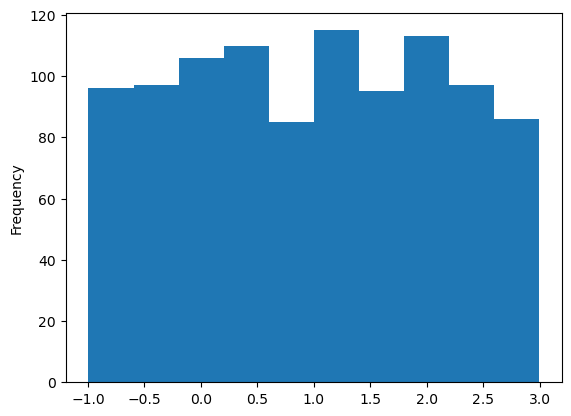
here, the change is permanent, as you changed the model used to load the instance:
snia.model # check-out the c-entry
{'redshift': {'kwargs': {'zmax': 0.2}, 'as': 'z'},
 'x1': {'func': <function SNeIaStretch.nicolas2021 at 0x2a1033640>},
 'c': {'func': <built-in method uniform of numpy.random.mtrand.RandomState object at 0x1100abe40>,
       'kwargs': {'low': -1, 'high': 3}},
 't0': {'func': <built-in method uniform of numpy.random.mtrand.RandomState object at 0x1100abe40>,
        'kwargs': {'low': 56000, 'high': 56200}},
 'magabs': {'func': <function SNeIaMagnitude.tripp1998 at 0x2a10336d0>,
            'kwargs': {'x1': '@x1',
                       'c': '@c',
                       'mabs': -19.3,
                       'sigmaint': 0.1,
                       'alpha': -0.15,
                       'beta': 3.8}},
 'magobs': {'func': 'magabs_to_magobs',
            'kwargs': {'z': '@z', 'magabs': '@magabs'}},
 'x0': {'func': 'magobs_to_amplitude',
        'kwargs': {'magobs': '@magobs', 'param_name': 'x0'}},
 'radec': {'func': <function random_radec at 0x17b8f0dc0>,
           'kwargs': {},
           'as': ['ra', 'dec']},
 'mwebv': {'func': <function get_mwebv at 0x2a1032d40>,
           'kwargs': {'ra': '@ra', 'dec': '@dec'}}}
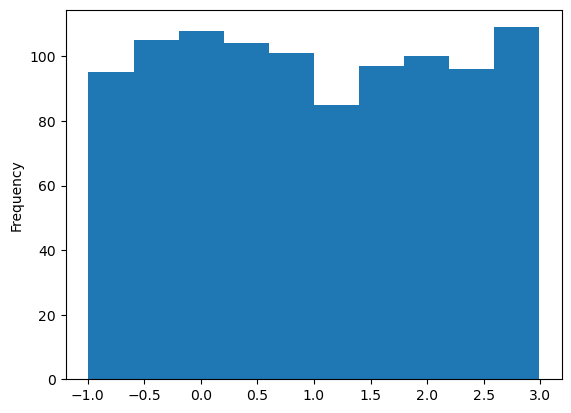
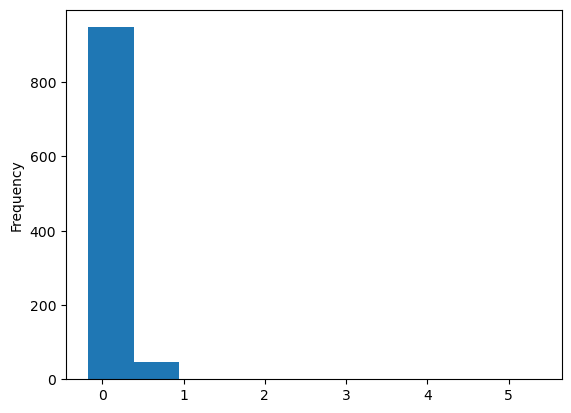
to change the model only for a draw() call
snia = skysurvey.SNeIa()
data_updated = snia.draw(size=1_000, model=new_model_for_c)
data_not_updated = snia.draw(size=1_000)
data_updated["c"].plot.hist()
<Axes: ylabel='Frequency'>
data_not_updated["c"].plot.hist()
<Axes: ylabel='Frequency'>
Use update_model()#
You can directly change (permanently) the model using update_model:
flat_model = {"c": {"func": np.random.uniform, "kwargs": {"low":-0.1, "high":+1}},
              "x1": {"func": np.random.uniform, "kwargs": {"low":-3, "high":+3}}
             }

snia = skysurvey.SNeIa()
snia.update_model(**flat_model)
data = snia.draw(1_000)
data
| z | x1 | c | t0 | ra | dec | magabs | mwebv | magobs | x0 | |
|---|---|---|---|---|---|---|---|---|---|---|
| 0 | 0.19865 | 1.176186 | 0.444875 | 56008.340695 | 222.896552 | -1.865063 | -17.675075 | 0.080541 | 22.335060 | 0.000018 |
| 1 | 0.09855 | 0.709318 | 0.437820 | 56096.020402 | 158.830749 | -9.360366 | -17.768205 | 0.038432 | 20.585214 | 0.000093 |
| 2 | 0.07125 | -0.583655 | -0.001735 | 56161.352299 | 40.159907 | -24.963720 | -19.342852 | 0.030212 | 18.266083 | 0.000784 |
| 3 | 0.06465 | 2.065721 | 0.245723 | 56099.688732 | 151.643297 | 62.479109 | -18.483481 | 0.025641 | 18.904432 | 0.000435 |
| 4 | 0.18575 | -2.142388 | 0.133901 | 56132.462905 | 160.724741 | 44.962650 | -18.311956 | 0.024015 | 21.536072 | 0.000039 |
| ... | ... | ... | ... | ... | ... | ... | ... | ... | ... | ... |
| 995 | 0.13945 | 0.925297 | 0.113981 | 56051.033345 | 101.707529 | 62.187247 | -19.117665 | 0.152948 | 20.046828 | 0.000152 |
| 996 | 0.08255 | 0.951880 | 0.651901 | 56007.822847 | 334.024022 | 58.718666 | -16.954604 | 1.691119 | 20.990792 | 0.000064 |
| 997 | 0.16525 | 2.239961 | 0.897326 | 56053.932034 | 191.704559 | -51.507224 | -16.329488 | 0.340121 | 23.238086 | 0.000008 |
| 998 | 0.15115 | 1.332900 | 0.508084 | 56145.351300 | 274.529018 | 36.913573 | -17.509565 | 0.043677 | 21.845660 | 0.000029 |
| 999 | 0.12975 | 0.026171 | 0.742875 | 56032.272295 | 145.614963 | -20.215206 | -16.616113 | 0.074815 | 22.378542 | 0.000018 |
1000 rows × 10 columns
Shall I update a model or create a new one ?#
model option can affect any entry, you can even add entry, but any new entry will be appended at the end of the dist model. So to create an internal dependency, you will need to create a new model from scratch.
How to insert a new entry to create an internal dependency#
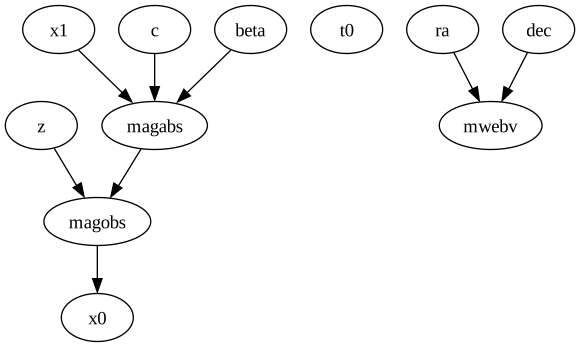
Say you want to randomly draw beta from a normal distribution and use this drawn parameter as input of magabs.
Using update_model() will work because modeldag orders the model entry prior to call draw(). Hence, beta will be inserted prior magabs the used model dict. However, do not forget to update the magabs kwargs to specify that beta must use the drawn beta.
random_beta_model = {"beta": {"func": np.random.normal, "kwargs": {"loc":3.5, "scale":0.1}}}
snia = skysurvey.SNeIa.from_draw(1_000, model=random_beta_model,
                                magabs={"beta":"@beta"}  # don't forget to update magabs
                                )
snia.model.visualize()
snia.data
| z | x1 | c | t0 | ra | dec | beta | magabs | mwebv | magobs | x0 | template | |
|---|---|---|---|---|---|---|---|---|---|---|---|---|
| 0 | 0.18755 | 0.310 | 0.100449 | 56100.199219 | 91.745285 | 26.643330 | 3.502293 | -19.082514 | 0.438025 | 20.788748 | 0.000077 | salt2 |
| 1 | 0.12435 | -0.080 | 0.106237 | 56125.371094 | 69.915680 | 21.941198 | 3.520313 | -18.815409 | 0.282333 | 20.079466 | 0.000148 | salt2 |
| 2 | 0.18605 | -1.530 | 0.105854 | 56039.820312 | 239.642227 | -24.382992 | 3.617054 | -18.552702 | 0.372540 | 21.299213 | 0.000048 | salt2 |
| 3 | 0.11905 | -2.500 | -0.031302 | 56158.765625 | 332.705963 | -19.575117 | 3.390035 | -19.192381 | 0.031475 | 19.600519 | 0.000229 | salt2 |
| 4 | 0.12445 | -1.280 | -0.134878 | 56014.058594 | 124.406120 | 3.857391 | 3.389037 | -19.595694 | 0.024401 | 19.301065 | 0.000302 | salt2 |
| ... | ... | ... | ... | ... | ... | ... | ... | ... | ... | ... | ... | ... |
| 995 | 0.17325 | 1.370 | 0.315792 | 56052.222656 | 1.105094 | 14.998715 | 3.482856 | -18.437946 | 0.067036 | 21.242723 | 0.000051 | salt2 |
| 996 | 0.17845 | 1.805 | 0.105748 | 56099.261719 | 297.663971 | -42.456161 | 3.445384 | -19.097910 | 0.086934 | 20.653700 | 0.000087 | salt2 |
| 997 | 0.18925 | 0.125 | -0.025275 | 56126.058594 | 289.028870 | -4.340125 | 3.559816 | -19.504374 | 0.641207 | 20.388643 | 0.000111 | salt2 |
| 998 | 0.16945 | -0.550 | 0.111878 | 56142.671875 | 3.465228 | 54.717876 | 3.474002 | -18.913858 | 0.306152 | 20.713709 | 0.000082 | salt2 |
| 999 | 0.12105 | 1.125 | 0.490803 | 56145.421875 | 75.796028 | -32.925766 | 3.558682 | -17.743340 | 0.023616 | 21.088533 | 0.000058 | salt2 |
1000 rows × 12 columns