
Transients#
The Transient object has a rate, a template and a model.
The rate informs on how many target we expect to have in nature for a redshift range. This is a float
The model specifies how the template parameters are drawn. This is a dict.
The template provides the spectro-photometric time serie of the transient given input parameters. This is based on sncosmo.Model
The first two enables you to draw a sample of transients as given by nature. This last one is needed only if you want to get the transient lightcurves (hence, notably, when you create a dataset).
Several transient classes have already been implemented (see “List of transient classes” documentation):
SNeIa (based on salt2 or salt3)
A diversity of core-collapse SNe (SNeII, SNeIIb, SNeIIn, SNeIb, SNeIc, SNeIcBL)
A generic Transient associated to any single sncosmo.TimeSerieSource (see the list here)
Kilonovae
SNeIa and “v19-2010al (a type IIn)” examples#
import skysurvey
Let’s start with Type Ia Supernovae.
The SNeIa Transient is already defined and ready to use.
snia = skysurvey.SNeIa()
Template, rate and model#
The following methods and attributes are commun to all transients; SNeIa here is just an example.
Template#
The template (skysurvey object) is stored here:
snia.template
<skysurvey.template.Template at 0x1a68354c0>
And it’s main attribute is the sncosmo_model up on which the template methods are built:
snia.template.sncosmo_model
<sncosmo.models.Model at 0x1a965bc20>
snia.template.source # short cut to snia.template.sncosmo_model.source
<SALT2Source 'salt2' version='T23' at 0x1a3135c70>
The template parameters are here (shortcut to snia.template.parameters):
snia.template_parameters # short
['z', 't0', 'x0', 'x1', 'c']
Rate#
Transient have the volume_rate parameter that provide the number of transient expected per year and per Gpc³.
snia.rate # in target/Gpc^3/year
23500.0
To get the number of expected transient in a redshift shell (full sky volume) use get_rate(z).
snia.get_rate(0.1) # Nature should provide ~8000 SNeIa (full sky) up to z=0.1
7967.328115462927
Model#
The model is the core of what defines a transient. It provides how the template parameters are generated.
from pprint import pprint
pprint(snia.model.model)
{'c': {'func': <function SNeIaColor.intrinsic_and_dust at 0x29e1b8670>},
 'magabs': {'func': <function SNeIaMagnitude.tripp1998 at 0x29f0175e0>,
            'kwargs': {'c': '@c', 'mabs': -19.3, 'sigmaint': 0.1, 'x1': '@x1'}},
 'magobs': {'func': 'magabs_to_magobs',
            'kwargs': {'magabs': '@magabs', 'z': '@z'}},
 'radec': {'as': ['ra', 'dec'],
           'func': <function random_radec at 0x29e1948b0>,
           'kwargs': {}},
 'redshift': {'as': 'z', 'kwargs': {'zmax': 0.2}},
 't0': {'func': <built-in method uniform of numpy.random.mtrand.RandomState object at 0x112774640>,
        'kwargs': {'high': 56200, 'low': 56000}},
 'x0': {'func': 'magobs_to_amplitude',
        'kwargs': {'magobs': '@magobs', 'param_name': 'x0'}},
 'x1': {'func': <function SNeIaStretch.nicolas2021 at 0x29f017550>}}
See details below
Draw a sample (as given by nature)#
You can then draw as many SNeIa as you want. The parameters will be drawn following the transient’s model (see below). These are SNeIa as given by nature following this model.
%%time
data = snia.draw(size=10_000)
CPU times: user 116 ms, sys: 17.6 ms, total: 133 ms
Wall time: 139 ms
data # another copy is stored as snia.data
| z | x1 | c | t0 | magabs | magobs | x0 | ra | dec | template | |
|---|---|---|---|---|---|---|---|---|---|---|
| 0 | 0.1875 | 1.500000e-01 | -0.01 | 56072.234375 | -19.268026 | 20.602594 | 0.000091 | 92.515419 | -18.609682 | salt2 |
| 1 | 0.1735 | 6.000000e-01 | -0.05 | 56090.179688 | -19.633657 | 20.050468 | 0.000152 | 197.517960 | -13.268378 | salt2 |
| 2 | 0.1345 | -1.600000e+00 | -0.04 | 56120.859375 | -19.238140 | 19.841116 | 0.000184 | 281.586731 | -7.159208 | salt2 |
| 3 | 0.0525 | 1.150000e+00 | 0.01 | 56045.167969 | -19.504412 | 17.412903 | 0.001720 | 274.563751 | 28.356302 | salt2 |
| 4 | 0.1075 | 4.500000e-01 | -0.03 | 56005.148438 | -19.531279 | 19.023716 | 0.000390 | 291.228760 | 19.725929 | salt2 |
| ... | ... | ... | ... | ... | ... | ... | ... | ... | ... | ... |
| 9995 | 0.1465 | -1.421085e-14 | -0.02 | 56003.605469 | -19.301497 | 19.979633 | 0.000162 | 266.749969 | -2.584787 | salt2 |
| 9996 | 0.0645 | -1.150000e+00 | 0.02 | 56071.453125 | -18.979286 | 18.403355 | 0.000691 | 295.088531 | -15.435308 | salt2 |
| 9997 | 0.1685 | -1.500000e-01 | 0.07 | 56126.812500 | -19.054039 | 20.560081 | 0.000095 | 179.171265 | -54.524261 | salt2 |
| 9998 | 0.1945 | 1.000000e-01 | -0.08 | 56048.589844 | -19.554113 | 20.404961 | 0.000109 | 155.495758 | 12.959204 | salt2 |
| 9999 | 0.1875 | -5.000000e-01 | 0.22 | 56072.816406 | -18.566608 | 21.304010 | 0.000048 | 257.669525 | 9.419182 | salt2 |
10000 rows × 10 columns
snia.data
| z | x1 | c | t0 | magabs | magobs | x0 | ra | dec | template | |
|---|---|---|---|---|---|---|---|---|---|---|
| 0 | 0.1875 | 1.500000e-01 | -0.01 | 56072.234375 | -19.268026 | 20.602594 | 0.000091 | 92.515419 | -18.609682 | salt2 |
| 1 | 0.1735 | 6.000000e-01 | -0.05 | 56090.179688 | -19.633657 | 20.050468 | 0.000152 | 197.517960 | -13.268378 | salt2 |
| 2 | 0.1345 | -1.600000e+00 | -0.04 | 56120.859375 | -19.238140 | 19.841116 | 0.000184 | 281.586731 | -7.159208 | salt2 |
| 3 | 0.0525 | 1.150000e+00 | 0.01 | 56045.167969 | -19.504412 | 17.412903 | 0.001720 | 274.563751 | 28.356302 | salt2 |
| 4 | 0.1075 | 4.500000e-01 | -0.03 | 56005.148438 | -19.531279 | 19.023716 | 0.000390 | 291.228760 | 19.725929 | salt2 |
| ... | ... | ... | ... | ... | ... | ... | ... | ... | ... | ... |
| 9995 | 0.1465 | -1.421085e-14 | -0.02 | 56003.605469 | -19.301497 | 19.979633 | 0.000162 | 266.749969 | -2.584787 | salt2 |
| 9996 | 0.0645 | -1.150000e+00 | 0.02 | 56071.453125 | -18.979286 | 18.403355 | 0.000691 | 295.088531 | -15.435308 | salt2 |
| 9997 | 0.1685 | -1.500000e-01 | 0.07 | 56126.812500 | -19.054039 | 20.560081 | 0.000095 | 179.171265 | -54.524261 | salt2 |
| 9998 | 0.1945 | 1.000000e-01 | -0.08 | 56048.589844 | -19.554113 | 20.404961 | 0.000109 | 155.495758 | 12.959204 | salt2 |
| 9999 | 0.1875 | -5.000000e-01 | 0.22 | 56072.816406 | -18.566608 | 21.304010 | 0.000048 | 257.669525 | 9.419182 | salt2 |
10000 rows × 10 columns
Tip: You can directly use the from_draw() classmethod to load a transient instance already drawn.
snia = skysurvey.SNeIa.from_draw(10000)
TimeSerieTransient (TSTransient)#
Nothing is easier than loading any sncosmo TimeSeriesSource as a skysurvey Transient
Simply provide the template name in the from_sncosmo_source() method or directly in the from_draw()
snIIn = skysurvey.TSTransient.from_draw(size=4_000, template="v19-2010al")
snIIn.data
| z | t0 | magabs | magobs | amplitude | ra | dec | template | |
|---|---|---|---|---|---|---|---|---|
| 0 | 0.0355 | 56012.058594 | -16.428717 | 19.612431 | 4.895860e-16 | 322.432922 | 80.907799 | v19-2010al |
| 1 | 0.0435 | 56030.718750 | -17.641235 | 18.853775 | 9.846714e-16 | 232.847534 | 41.982239 | v19-2010al |
| 2 | 0.0465 | 56054.390625 | -17.939707 | 18.704796 | 1.129492e-15 | 111.107796 | 52.031773 | v19-2010al |
| 3 | 0.0415 | 56197.652344 | -17.983982 | 18.405697 | 1.487725e-15 | 220.282745 | 42.826267 | v19-2010al |
| 4 | 0.0355 | 56177.250000 | -18.428286 | 17.612862 | 3.087856e-15 | 281.257721 | 59.345467 | v19-2010al |
| ... | ... | ... | ... | ... | ... | ... | ... | ... |
| 3995 | 0.0305 | 56030.300781 | -17.969431 | 17.734150 | 2.761479e-15 | 94.419128 | 27.301165 | v19-2010al |
| 3996 | 0.0355 | 56143.792969 | -17.758659 | 18.282488 | 1.666503e-15 | 99.915894 | 29.687843 | v19-2010al |
| 3997 | 0.0315 | 56002.023438 | -17.641779 | 18.133444 | 1.911717e-15 | 3.331716 | -41.621284 | v19-2010al |
| 3998 | 0.0315 | 56023.152344 | -19.774693 | 16.000530 | 1.363293e-14 | 59.934765 | -8.836870 | v19-2010al |
| 3999 | 0.0465 | 56099.867188 | -17.867636 | 18.776865 | 1.056952e-15 | 148.240341 | 33.067303 | v19-2010al |
4000 rows × 8 columns
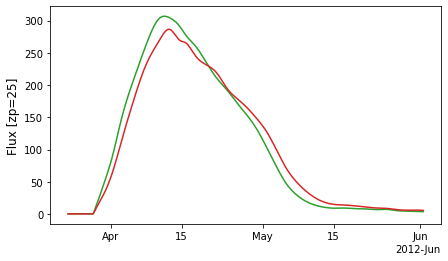
_ = snIIn.show_lightcurve(["ztfg","ztfr"], index=50)
More details on the model#
The data (list of transients) are generated following the model, stored as self.model.
tip: the transient model is display (better formated) when you print the object
snia
{'redshift': {'kwargs': {'zmax': 0.2}, 'as': 'z'},
 'x1': {'func': <function SNeIaStretch.nicolas2021 at 0x29f017550>},
 'c': {'func': <function SNeIaColor.intrinsic_and_dust at 0x29e1b8670>},
 't0': {'func': <built-in method uniform of numpy.random.mtrand.RandomState object at 0x112774640>,
        'kwargs': {'low': 56000, 'high': 56200}},
 'magabs': {'func': <function SNeIaMagnitude.tripp1998 at 0x29f0175e0>,
            'kwargs': {'x1': '@x1', 'c': '@c', 'mabs': -19.3, 'sigmaint': 0.1}},
 'magobs': {'func': 'magabs_to_magobs',
            'kwargs': {'z': '@z', 'magabs': '@magabs'}},
 'x0': {'func': 'magobs_to_amplitude',
        'kwargs': {'magobs': '@magobs', 'param_name': 'x0'}},
 'radec': {'func': <function random_radec at 0x29e1948b0>,
           'kwargs': {},
           'as': ['ra', 'dec']}}
How does model works#
It is based on the modeldag package.
To generate data, the code reads model line-by-line and follows the instructions it contains.
In this SNeIa example, model contains 8 entries. So the generated data will contains at least 8 columns (see the as option).
A model entry accepts 3 keywords:
func: (name of) the function used to draw the sample, e.g. np.random.uniform ;
kwargs: options that enter the function as kwargs. Use
a='@key'to use the result of a previously drawn ‘key’ as'a'input entering func ;as: (list of) name(s) of the column on the resulting
data;
“@” in “kwargs” to form a “DAG”#
The @ trick in kwargs enables you to generate self-consistent parameters.
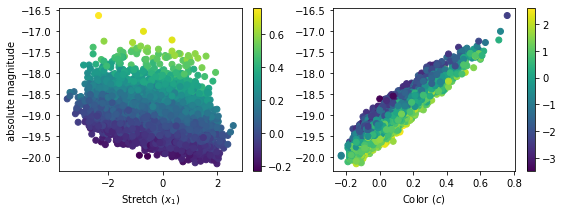
For instance, the absolute magnitude of a SNeIa depends on its stretch and color (following the alpha*x_1 - beta*c Tripp’s relation). Hence, once the x_1and c (independent) variables have been drawn, the SNeIa absolute magnitude (magabs) can be obtained using as input the already drawn x_1 and c parameters. Same goes for the observed magnitude, it only dependents on the absolute magnitude magabs and the redshift z.
The (potentially complex) connections between the variables enabled by using @key (e.g. @c) corresponds to the creation a Directed acyclic graph.
You can complexify your model creating as many variables and intermediate variables as you want.
the func option, where to define the function#
The func option is the function that will be used to generate the dataset. In principle, it should accept size as parameters and return N=size values except if a “@” is used in input (for its size is alreadyu defined by the initial called key)
In your model, the func option can be a function or a string.
a function will be used as such
a string will be converted in function, it typically means you input a method of the class ; though more advanced tools exist, see “Build a new Model” documentation.
Plotting#
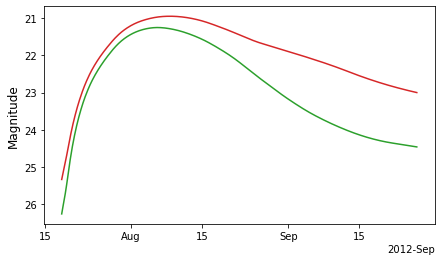
Show a given lightcurve in any band known by sncosmo, for instance here that on the snia index 9 snia.data.loc[9].
Lightcurve#
band = ["ztfr","ztfg"]
fig = snia.show_lightcurve(band, index=9, in_mag=True)
Parameters (visualize the relation created by self.model)#
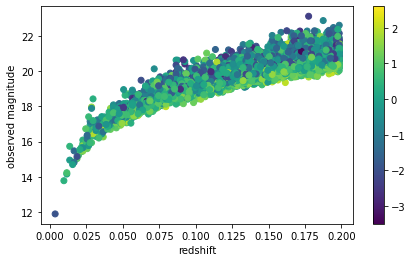
You can also show the scatter between any parameters. The parameter correlations are handled by your model:
fig = snia.show_scatter("z", "magobs", ckey="x1")
ax = fig.axes[0]

_ = ax.set_ylabel("observed magnitude")
_ = ax.set_xlabel("redshift")
import matplotlib.pyplot as plt
fig = plt.figure(figsize=[9,3])
ax1 = fig.add_subplot(121)
ax2 = fig.add_subplot(122)

_ = snia.show_scatter("x1", "magabs", ckey="c", ax=ax1)
_ = snia.show_scatter("c", "magabs", ckey="x1", ax=ax2)

_ = ax1.set_ylabel("absolute magnitude")
_ = ax1.set_xlabel(r"Stretch ($x_1$)")
_ = ax2.set_xlabel(r"Color ($c$)")
Getter#
You have several pre-defined methods to access parameters or the template directly:
Template parameters#
The get_template_parameters method enables you to get the subpart of data that corresponds to actual template (sncosmo.Model) parameters:
snia.get_template_parameters()
| z | x1 | c | t0 | x0 | |
|---|---|---|---|---|---|
| 0 | 0.1795 | -1.421085e-14 | 6.000000e-02 | 56019.402344 | 0.000083 |
| 1 | 0.0275 | 2.500000e-01 | 1.300000e-01 | 56039.234375 | 0.003857 |
| 2 | 0.1325 | 1.500000e-01 | -3.000000e-02 | 56091.226562 | 0.000251 |
| 3 | 0.0985 | 7.500000e-01 | 5.000000e-02 | 56159.093750 | 0.000323 |
| 4 | 0.1645 | -1.421085e-14 | -3.000000e-02 | 56089.609375 | 0.000164 |
| ... | ... | ... | ... | ... | ... |
| 9995 | 0.1605 | 1.500000e+00 | -7.000000e-02 | 56078.507812 | 0.000165 |
| 9996 | 0.1005 | -5.000000e-01 | -1.000000e-02 | 56021.921875 | 0.000344 |
| 9997 | 0.1865 | -4.000000e-01 | -7.000000e-02 | 56155.128906 | 0.000115 |
| 9998 | 0.1515 | -1.250000e+00 | 2.775558e-16 | 56037.839844 | 0.000103 |
| 9999 | 0.1365 | 1.000000e+00 | 4.000000e-02 | 56053.109375 | 0.000197 |
10000 rows × 5 columns
You can also request to only have the template parameters for a given target
(similar to as snia.get_template_parameters().loc[index]):
snia.get_template_parameters(index=9)
z         0.179500
x1        0.050000
c         0.260000
t0    56146.316406
x0        0.000049
Name: 9, dtype: float32
Template (sncosmo.Model)#
You can get a template (sncosmo.Model) either with default values:
template = snia.get_template(index=None) # default
template
<skysurvey.template.Template at 0x2a1bc4bb0>
template.sncosmo_model.parameters
array([0. , 0. , 1. , 0. , 0. , 0. , 3.1])
or with parameters set to match those of a target:
template_target9 = snia.get_template(index=9)
template_target9.sncosmo_model.parameters
array([1.79499999e-01, 5.61463164e+04, 4.89364647e-05, 5.00000007e-02,
       2.59999990e-01, 0.00000000e+00, 3.10000000e+00])
or affecting parameters:
template_target9 = snia.get_template(index=9, x1=-5)
template_target9.sncosmo_model.parameters
array([ 1.79499999e-01,  5.61463164e+04,  4.89364647e-05, -5.00000000e+00,
        2.59999990e-01,  0.00000000e+00,  3.10000000e+00])